
How Smore works
Smore has two parts:
- Your backend uses the Smore API to create scenes and studio sessions.
- Your frontend opens the Smore studio in an iframe.
Create a scene
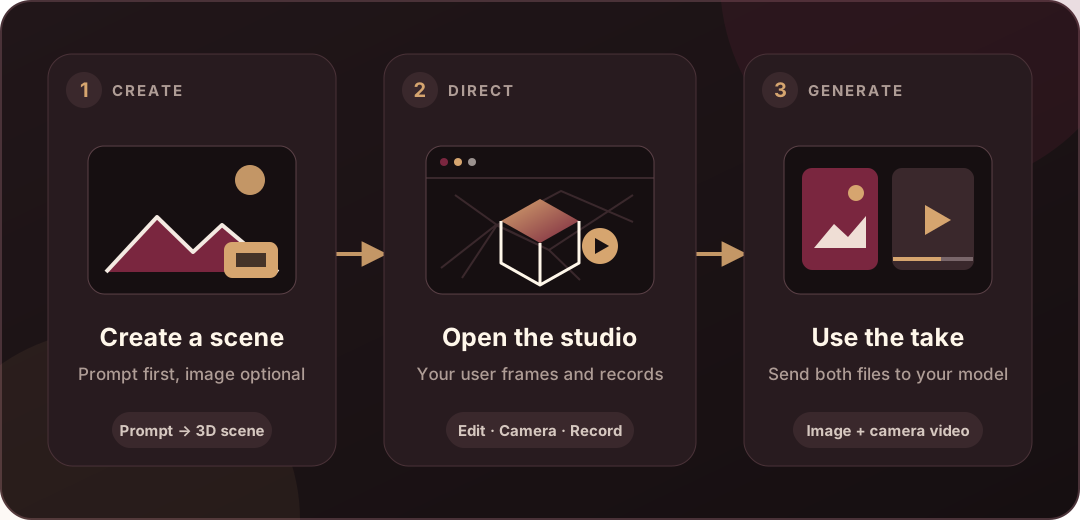
Section titled “Create a scene”Send a prompt and, if you have one, a reference image. Smore builds a 3D scene and returns its ID and version. You can attach the image later from the studio.
Store the scene ID with the matching record in your database. Smore keeps the scene geometry and generation details internal.
Open the studio
Section titled “Open the studio”Create a studio session for the scene and use the returned URL as the iframe src. Your user can edit the scene, frame the shot, move the camera, and record a take.
Use the recorded take
Section titled “Use the recorded take”After recording, the iframe sends your page a reference package ID. Your backend uses that ID to fetch the original image and an MP4 camera reference for your video pipeline.
Wait for scene changes
Section titled “Wait for scene changes”Scene creation and edits run in the background. The API returns an operation ID. Poll the operation until it succeeds or fails.